

TL;DR:
AI doesn’t forget because it’s dumb. It forgets because you didn’t build a system that remembers.
This post shows how I fixed that using compound engineering and Factory Droid.
I’ve been coding with AI for about 14 months. Many active projects across Python, SvelteKit, Next.js, and FastAPI. I use Factory Droid as my daily driver — it’s where I live. And until today, every single one of those projects had the same problem.
I’d have a great coding session. Ship something real. Feel good about it. Close the terminal. And then when I came back — maybe the next day, maybe a week later — I’d spend the first few minutes trying to remember where I was. What was working. What was broken. What I’d been deciding right before I stopped.
That’s bad enough. But here’s the part that everyone who codes with AI knows and dreads: your AI agent has the same problem, except worse.
When you come back to a project after a week, you’ve at least got fuzzy memories. You remember the general shape of things. The agent remembers nothing. Every new session starts at absolute zero. It doesn’t know what you built yesterday, what patterns you established, what you tried and abandoned, or what decisions you were weighing. You spend the first several minutes — sometimes longer — just getting your AI partner oriented. Pasting in context. Explaining the codebase. Pointing it at the right files. And then halfway through a long session, when the context window compacts, it can forget again. You’re re-onboarding your own tool multiple times per session. 50 First Dates, but with a bot.
I’m a big believer in good documentation. I’m just not great at remembering to write it. And here’s the uncomfortable realization: in AI-assisted development, documentation isn’t just a nice-to-have for future-you. It’s the operating system for your AI partner. Without it, you’re hiring a brilliant contractor who shows up every morning with total amnesia.
That’s the knowledge decay loop, and it hits both sides of the partnership. Every productive session that ends without documentation is a loan against your future self and your future agent — with interest.
Today I read Every’s guide on compound engineering, and something clicked. This wasn’t just a system for organizing my own memory. It was a system for giving my AI partners the context they need to be useful from the first line of every session.
What Is Compound Engineering (And Why Should You Care)
The core idea is almost offensively simple: every unit of work should make subsequent work easier, not harder.
Most codebases get harder to work with over time. Each feature adds complexity. After enough cycles, you’re spending more time fighting the system than building on it. Compound engineering inverts this. Bug fixes eliminate categories of future bugs. Patterns become tools. The codebase gets easier to understand, not harder.
The mechanism is a four-step loop: Plan → Work → Review → Compound.
The first three steps are normal engineering. It’s the fourth that changes everything. After you ship, you capture what worked, what didn’t, and what the reusable insight is — then you feed it back into the system so the next cycle starts from a better position. Skip the compound step and you’ve done traditional engineering with AI assistance. Do it, and the system learns.
Every built a plugin for this — 26 specialized agents, 23 workflow commands, 13 skills — and shipped it for Claude Code. I don’t use Claude Code. I use Factory Droid.
So I made it work anyway. Here’s how.
Installing the Plugin (The Easy Part)
Factory Droid’s docs explicitly state Claude Code plugin compatibility. The install is two commands:
droid plugin marketplace add https://github.com/EveryInc/compound-engineering-plugin
droid plugin install compound-engineering@compound-engineering-plugin
Note that second command — you need the plugin@marketplace format. If you just run droid plugin install compound-engineering, you’ll get an error about invalid plugin format. The marketplace name is compound-engineering-plugin(the repo name), so the full identifier is compound-engineering@compound-engineering-plugin.
You’ll see something like:
Successfully installed compound-engineering@compound-engineering-plugin (e8f3bbc)
That hex string is the Git commit hash Droid pins to. You can verify the install by running /plugins inside a Droid session and checking the Installed tab — you should see the plugin with user scope, today’s date, and a cache path.
Great. Plugin installed. Now try running /workflows:plan.
Nothing happens.
The Gotcha (way to be non-standard, you Droid user you)
The plugin installs cleanly. It shows up in your installed plugins list. But the slash commands don’t register. Type /plan or /workflows:plan and Droid has no idea what you’re talking about.
This is a known issue — GitHub issue #31 on the compound engineering plugin repo. The root cause: the plugin’s command structure uses nested directories (commands/workflows/plan.md), and Droid doesn’t auto-register commands from plugin subdirectories the way Claude Code does. The plugin format is compatible, but the command discovery isn’t.
The fix is manual, and it takes about two minutes.
First, find where Droid cached the plugin:
ls ~/.factory/plugins/cache/compound-engineering-plugin/compound-engineering/
You’ll see a directory named with the commit hash from your install. Inside it:
CHANGELOG.md commands/ droids/ LICENSE README.md skills/
Good news: the plugin already uses droids/ instead of agents/, so the naming matches Factory Droid’s conventions. Now copy everything to your user-level Droid config:
mkdir -p ~/.factory/commands ~/.factory/droids ~/.factory/skills

cp -r ~/.factory/plugins/cache/compound-engineering-plugin/compound-engineering/[hash]/commands/* ~/.factory/commands/
cp -r ~/.factory/plugins/cache/compound-engineering-plugin/compound-engineering/[hash]/droids/* ~/.factory/droids/
cp -r ~/.factory/plugins/cache/compound-engineering-plugin/compound-engineering/[hash]/skills/* ~/.factory/skills/
Replace [hash] with the actual commit hash directory name.
Restart Droid. Type /plan. It autocompletes. You now have /plan, /work, /brainstorm, /deepen-plan, /technical_review, /document-review, and everything else — registered as top-level commands. The workflows:namespace prefix gets dropped, which is actually cleaner for daily use.
That’s the entire technical setup. Everything from here is about making it actually useful.
The Foundation: Your Engineering Constitution
A plugin gives you commands. But commands without context produce generic results. The thing that makes compound engineering compound is the context — the accumulated knowledge about how you work, what you care about, and what your projects look like.
That context lives in two places.
Global AGENTS.md
Factory Droid reads ~/.factory/AGENTS.md at the start of every session across all your projects. Think of this as your engineering constitution — the baseline expectations that apply everywhere, regardless of which project you’re in.
Mine includes:
A Session Protocol. The agent reads docs/STATUS.md at the start of every session and updates it at the end. If I forget, it reminds me. This single habit solves about 80% of the “where was I?” problem.
Test-Driven Development as a core methodology. Write tests first, always. The agent is instructed to pause me if I jump into implementation without tests. More on this later — there’s a story here.
A security baseline. Input validation, parameterized queries, secrets in env vars, auth on every endpoint. I listed security as a growth area in my AGENTS.md because it is, and I’d rather the agent be proactive about it than wait for me to ask.
The compound engineering loop itself, with TDD included. Plan → TDD → Work → Review → Compound, with specific instructions for each step. The agent knows the sequence and knows not to skip the compound step.
Communication preferences. Speak at a systems level. Explain your reasoning. If there’s a better architectural approach, propose it — don’t just implement what I asked for.
The global AGENTS.md provides defaults. Each project has its own AGENTS.md in the project root that adds project-specific patterns, stack details, and lessons learned. Project-level takes precedence when they conflict.
STATUS.md (The Session Continuity System)
Every project gets a docs/STATUS.md that answers five questions: What’s the project? What’s done? What’s in progress? What’s next? What decisions are pending?
That last one — Open Decisions — is the most valuable section. “What was I building” is recoverable. You can look at the code, read the commit history, figure it out. But “what was I deciding and which way was I leaning” — that vanishes completely between sessions. If you’re weighing two approaches to auth and you close the terminal without documenting your reasoning, future-you either reverse engineers or repeats the process. Let’s not do that, shall we?
I built a slash command called /init-project-docs that bootstraps the entire docs structure for any project. Run it once, and the agent creates docs/STATUS.md (auto-populated from your README and package.json), plus empty directories for plans/, solutions/, decisions/, and brainstorms/. Under 30 seconds, and you never have to remember the template structure.
The First Real Test: BishopricOS
Theory is great. Does it actually work?
I took this system into BishopricOS — a Notion-based operating system for church leadership that I’m rebuilding as a standalone web app. I needed to add a wiki feature: sections, pages, version history, public sharing, the works.
Brainstorm → Plan → Deepen-Plan: The Best Planning I’ve Ever Done
I started with /brainstorm because the requirements were fuzzy. I knew I wanted a wiki. I didn’t know exactly what that meant for this app, this user base, this tech stack. When you’re building for volunteer church leaders who rotate every few years, “wiki” doesn’t mean the same thing as it does for a developer team.
As always, I started by dictating as much context as I could. I use VoiceInk for this (though MacWhisper is also excellent). I’ve had amazing results when working with AI coding partners when I dictate much more than I type, especially during brainstorming and planning. (And let’s be real--it makes me feel like I’m on Star Trek to just talk to the computer.)
The brainstorm command asked me targeted questions after I gave it my dictation dump — one at a time, not a wall of twenty — about purpose, users, constraints, and edge cases. Who creates content? Who reads it? Does content need to be public or just internal? By the end, I had clarity I wouldn’t have reached by just thinking about it, because the questions forced me to confront decisions I was unconsciously deferring.
Then /plan. The agent researched the existing codebase — not just the file structure, but the patterns I’d already established. It found my Prisma schema conventions, my API route structure, my auth patterns with Clerk. And it produced a structured implementation plan that actually matched how the rest of the app was built. This is the part that surprised me most. It wasn’t generic “here’s how to build a wiki” advice — it was “here’s how to build a wiki that fits this specific codebase.”
I pushed back on scope. “This is too much for one session — break it into phases.” It restructured into six phases: database models and CRUD API first, then Tiptap editor integration, drag-and-drop ordering, public page routes, version history UI, and search. Each phase buildable and shippable independently. That kind of progressive disclosure is hard to do well, and I would have been tempted to build it all at once and end up with something half-finished.
Then /deepen-plan. This is where it got genuinely impressive. The command spawns 40+ parallel research agents that go deep on the plan — checking framework docs for SvelteKit-specific patterns, looking for best practices around wiki-style content management, analyzing edge cases I hadn’t considered. Things like: what happens to public share links when a page is deleted? How should version history interact with the wiki section hierarchy? Should page slugs be auto-generated or user-defined?
The plan that came back was significantly better than what I would have written myself. Not because I couldn’t have gotten there eventually, but because I would have skipped half the research and gone straight to building. I would have discovered those edge cases in production, filed mental notes to fix them later, and either never gotten back to them or interrupted the flow of the work by trying to fix things right away rather than sticking to the plan. (That’s my kryponite. Always finding ‘little things’ that will only take a moment to fix. Sure! That’s exactly how it always works. Promise.) The plan caught them before a single line of code was written.
This was the single highest-value part of the entire system. The 80/20 rule from compound engineering is real — 80% of the value is in planning and review, 20% is in execution. When the plan is right, the code practically writes itself. When the plan is wrong, all the AI-assisted coding speed in the world just gets you to the wrong place faster.
Technical Review: Parallel Skepticism
After implementation, /technical_review spawns a dozen specialized agents that review the code simultaneously — security, performance, architecture, data integrity, code simplicity. Each returns prioritized findings: P1 (must fix), P2 (should fix), P3 (nice to fix).
I’ll be honest: I expected this to be the least useful step. I’d already reviewed the code during implementation. The tests passed. What else was there?
A lot, as it turns out. It caught real issues at every stage. Auth boundaries that weren’t tight enough on the wiki page deletion endpoint — a user could potentially delete pages in sections they didn’t own by manipulating the API directly. A database query pattern that wasn’t properly scoped to the current tenant, which in a multi-tenant app is the kind of bug that causes you to want to become a tech-free monk. Performance concerns about how version history was being loaded (fetching all versions when only the latest was needed for the default view).
None of these were things I would have caught in my own review. Not because I’m careless, but because I was thinking about whether the feature worked. The review agents were thinking about whether it was safe, fast, and correct at the edges. Different questions, and both matter.
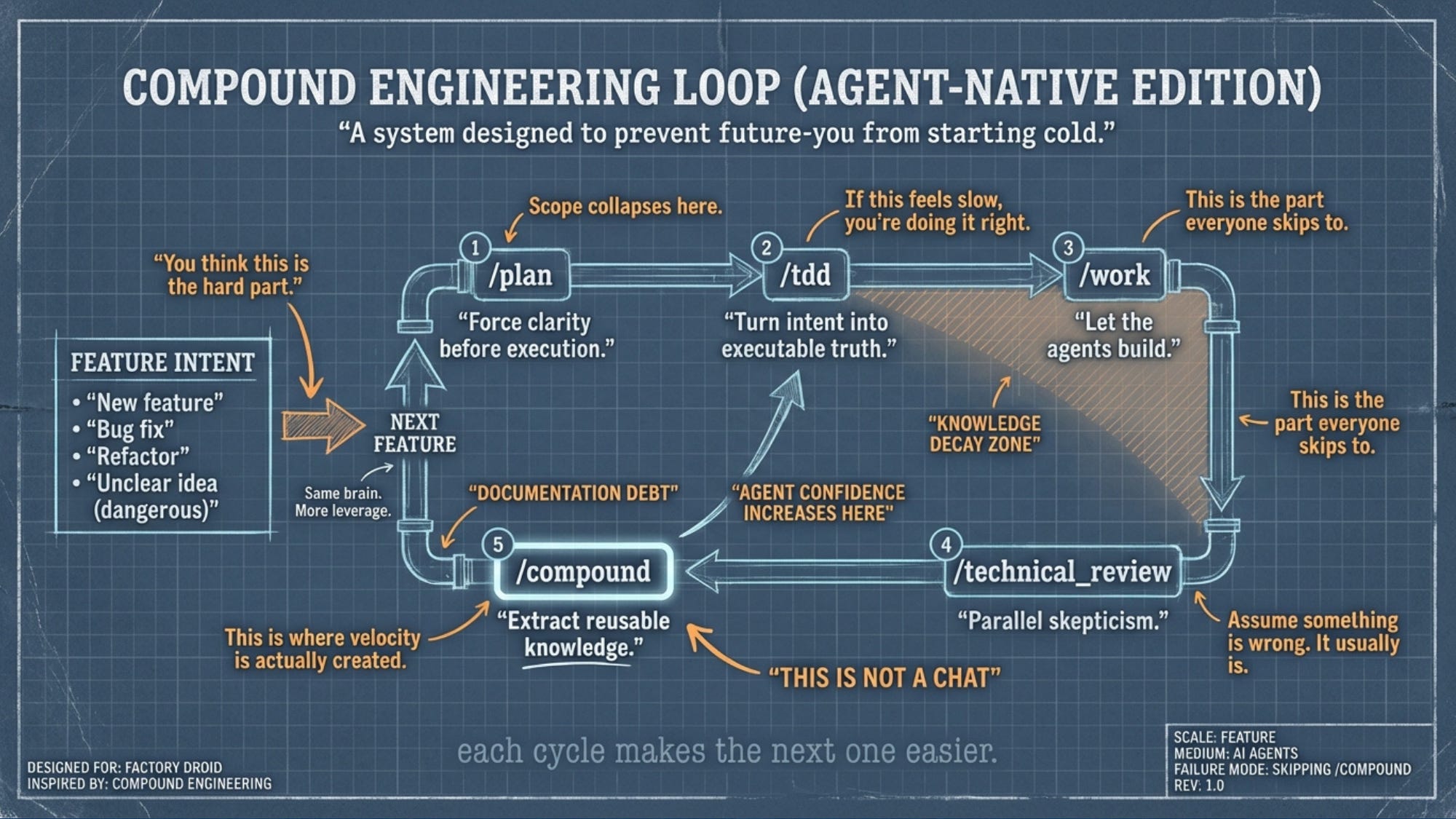
The graphic I made for this post labels the space between /work and /technical_review as the “Knowledge Decay Zone” — that’s the gap where you’ve built something and it feels done, but you haven’t stress-tested it yet. Lots of bugs that ship to prod in that gap.
The compound engineering guide suggests asking three questions before accepting any AI output:
“What was the hardest decision you made here?”
“What alternatives did you reject, and why?”
“What are you least confident about?”
These are incredibly effective. The agent knows where its weak points are. It knows which parts of the implementation were judgment calls. But it won’t volunteer that information unless you ask. These three questions are the magic pixie dust for getting honest answers from your AI coding partner.
The TDD Gap
Here’s where it gets interesting. After Phase 1 of the wiki feature shipped, the summary reported “All 366 existing tests pass.” That sounds great. But 366 was the number I started with. No new tests were written for the new feature. The agent built the wiki, verified nothing else broke, and called it done.
The compound engineering loop has Plan, Work, Review, and Compound. It doesn’t have a dedicated TDD step. And my global AGENTS.md says “write tests first” — but the slash commands don’t enforce it. The system had a gap.
So I built /tdd.
It’s a custom slash command that bridges /plan and /work. After you approve a plan, /tdd reads it, identifies every testable behavior — API responses, auth boundaries, database operations, edge cases — presents a test plan for your approval, then writes tests that all fail. Every single one. That failing state is your starting line. Then when you run /work, the agent implements until those tests go green.
The key safeguard: if any new test passes before implementation, it flags it — because that means the test is either redundant or not testing what it claims.
The updated loop: /plan → /tdd → /work → /technical_review → /compound
This was compound engineering compounding on itself. I used the system, found a gap, built a fix, and now every future session benefits. That’s the whole point.
The Cheat Sheet
This is what I keep open during coding sessions now. The full daily reference.
The Loop (Every Feature)
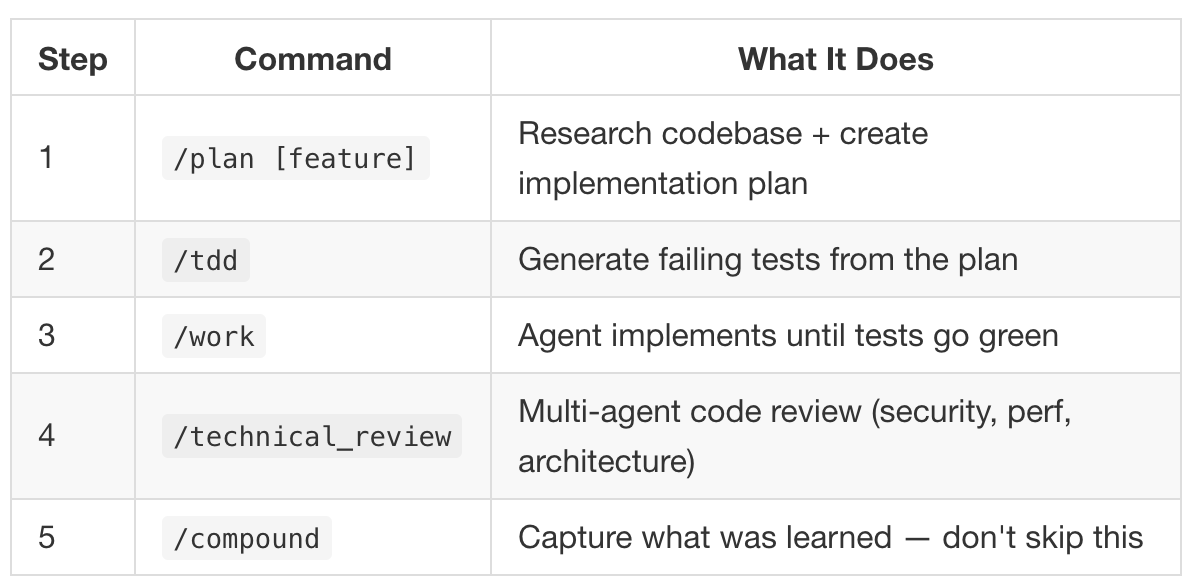
Step 1: /plan [feature]
Research codebase + create implementation plan
Step 2: /tdd
Generate failing tests from the plan
Step 3: /work
Agent implements until tests go green
Step 4: /technical_review
Multi-agent code review (security, perf, architecture)
Step 5: /compound
Capture what was learned, don’t skip this
Session Discipline
Start: Agent reads docs/STATUS.md, orients you in 30 seconds.
End: Agent updates docs/STATUS.md. Run test suite. Run /compound if you solved something non-trivial.
Other Commands Worth Knowing
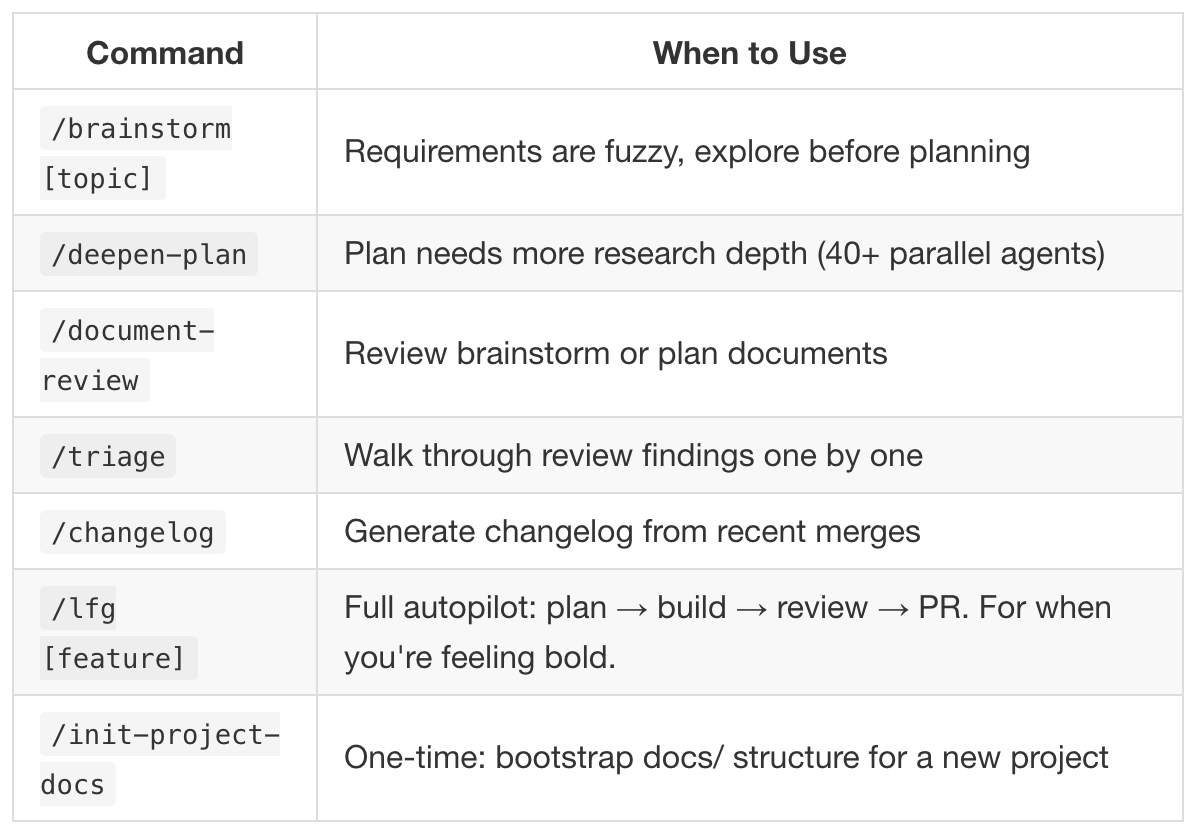
/brainstorm
Use this when requirements are fuzzy and you need to explore before committing to a plan.
/deepen-plan
When the plan exists, but needs real depth. Spins up parallel research agents to fill in the gaps.
/document-review
Review brainstorms or plans for clarity, gaps, and contradictions before execution.
/triage
Walk through review findings one by one instead of trying to hold everything in your head at once.
/changelog
Generate a changelog from recent merges without reconstructing history manually.
/lfg [feature]
Full autopilot: plan → build → review → PR.
For when you’re feeling bold and the safety nets are in place.
Key File Locations
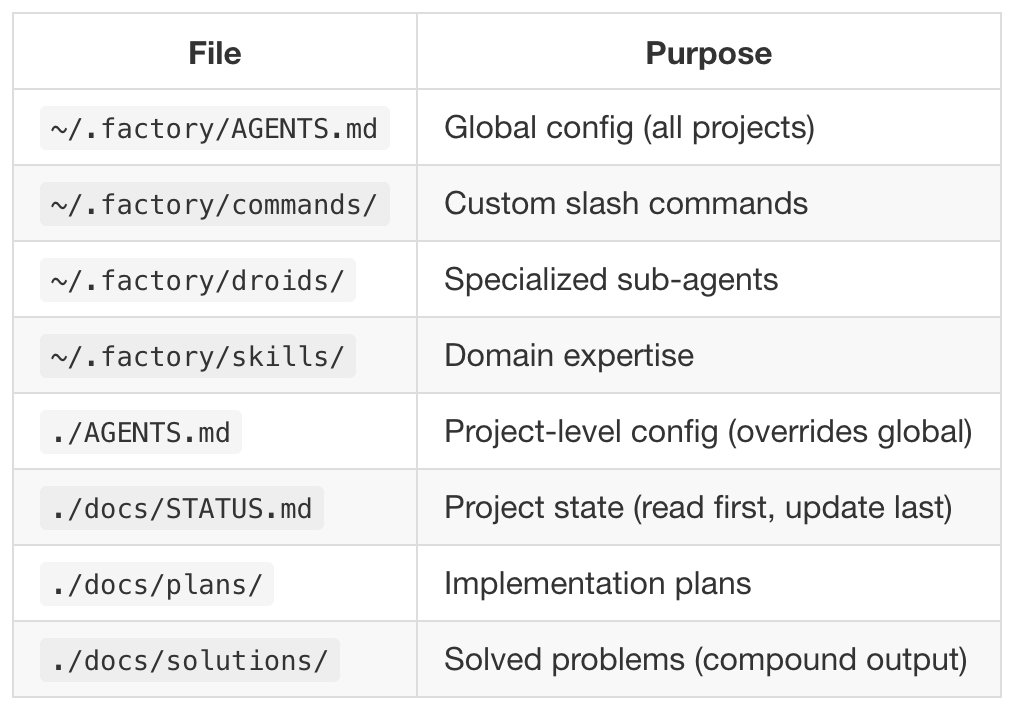
~/.factory/AGENTS.md
Global agent configuration. Applies to all projects unless explicitly overridden.
~/.factory/commands/
Your custom slash commands. This is where workflow discipline actually lives.
~/.factory/droids/
Specialized sub-agents with narrow responsibilities and opinions.
~/.factory/skills/
Domain expertise the agents can reuse instead of relearning every project.
./AGENTS.md
Project-level configuration. Overrides global defaults when they conflict.
./docs/STATUS.md
Current project state.
Read this first. Update it last. Future You is counting on it.
./docs/plans/
Implementation plans generated by /plan and refined by /deepen-plan.
./docs/solutions/
Solved problems. This is the compound interest account.
What This Actually Cost
Total setup time: about 45 minutes from zero to a working system. That includes the plugin install, troubleshooting the command registration issue, creating the global AGENTS.md, building the STATUS.md template and /init-project-docscommand, and building the custom /tdd command.
45 minutes of setup. The first coding session after that was the best I’ve ever had. Not the most productive in terms of lines of code (which is a dumb way to measure productivity, at least in my opinion) — the planning took longer than I’m used to. But the output was better than anything I’ve shipped from a single session. Tested, reviewed, documented, and with a clear path to the next phase. No knowledge debt. No “I’ll document this later.” No future-me cursing past-me for leaving him with nothing.
The Point
Here’s the mental model that ties it all together.
Compound engineering treats AI-assisted coding as a knowledge multiplier, not a speed multiplier. Each session doesn’t just produce code — it produces plans, tests, review findings, and documented solutions that make the next session start from a higher baseline. The code is a side effect. The system is the product.
The difference between “I built a wiki feature today” and “I built a wiki feature today and my project now has better documentation, a tested API surface, reviewed security boundaries, and a searchable record of how I solved the tricky parts” — that difference compounds. Three months from now, the second version of you is operating in a fundamentally different universe than the first.
Each cycle makes the next one easier. That’s the whole game.
The compound engineering plugin is built by Every. The guide is at every.to/guides/compound-engineering. The plugin repo is at github.com/EveryInc/compound-engineering-plugin. Factory Droid’s plugin docs are at docs.factory.ai/cli/configuration/plugins.
This post was co-written with Claude. The code was co-written with Factory Droid, using Opus 4.5. (’cmon Factory team, I want to use the shiny new Opus 4.6 already!) The graphic was designed with Nano Banana Pro. The system that made it all work was Every’s compound engineering. Turtles all the way down.